
Change where options display
Move your Infinite Options fields above or below variant pickers, quantity or the buy buttons by repositioning the Infinite Options Fields theme block.
Overview
Section titled “Overview”If your Infinite Options fields aren’t appearing where you’d like on the product page, you can move them by repositioning the Infinite Options Fields block in your product template.
You can place your options:
- Above or below your variant selectors
- Above or below the quantity selector
- Above or below the Add to Cart button
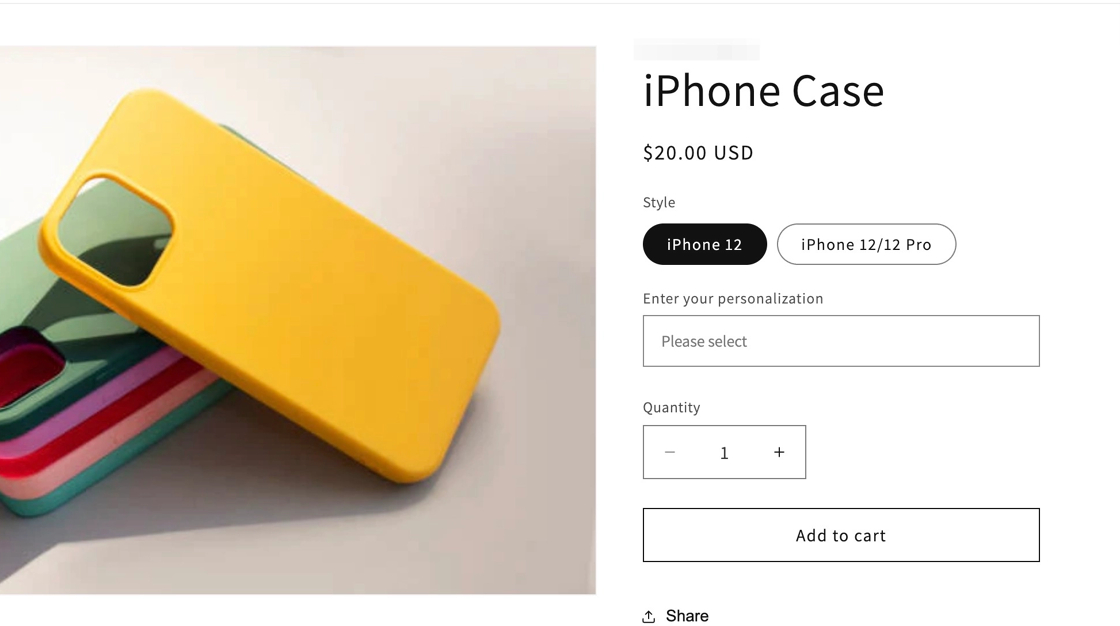
Where Infinite Options Can Display
Section titled “Where Infinite Options Can Display”The Infinite Options Fields block can be added to:
- Product pages
- Featured product sections that display a single product
It can’t be displayed on:
- Collection pages
- Quick view popups
- Sections that display multiple products
Before You Move the Block
Section titled “Before You Move the Block”You can move the Infinite Options Fields block anywhere within your product information section.
Most merchants place the Infinite Options Fields block below their variant selectors and above the Add to Cart button, but you can position it wherever it works best for your storefront.
Note: The block can’t be placed between Shopify variant selectors. For example, if your product has separate Color and Size selectors, place the block either above or below both selectors.
Once you know where you’d like your options to appear, follow the steps below to move the block.
How to Move the Options
Section titled “How to Move the Options”Step 1: Open the Theme Editor
Section titled “Step 1: Open the Theme Editor”From your Shopify admin:
- Go to Online Store > Themes.
- Click Customize.
Step 2: Open Your Product Template
Section titled “Step 2: Open Your Product Template”- Open the page selector.
- Select Products.
- Choose your product template (usually Default product).
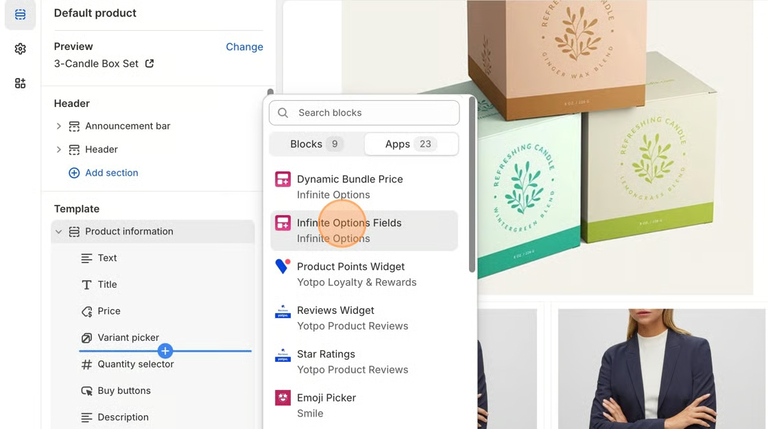
Step 3: Move the Infinite Options Fields Block
Section titled “Step 3: Move the Infinite Options Fields Block”Note: Each product template only needs one Infinite Options Fields block. Move the existing block instead of adding a second one.
In the left sidebar:
- Locate the Infinite Options Fields block.
- Drag and drop it to your preferred location within the product information section.
- Click Save.
Using a Shopify 1.0 Theme?
Section titled “Using a Shopify 1.0 Theme?”If your theme doesn’t support Shopify 2.0 app blocks, you’ll need to move the Infinite Options installation snippet instead of an app block.
See: Install Infinite Options on a Shopify 1.0 Theme
Troubleshooting
Section titled “Troubleshooting”I changed themes and my options moved
Section titled “I changed themes and my options moved”Each Shopify theme has its own layout.
If you switch themes, you’ll need to install the Infinite Options Fields block on the new theme and position it where you’d like your options to appear.
See Reinstall Infinite Options After Switching Themes
Can I move options anywhere on the page?
You can move them anywhere inside the product form.
They cannot be placed between Shopify variant fields.
Do I need to edit code?
Usually no. Most stores can use the app block in the theme editor.
Will your team help me if I get stuck?
Yes, absolutely. If something does not look right, contact us, and we will be happy to help.