
Adding an Upload Field - Uploadery
Learn how Infinite Options pairs with Uploadery for larger files, more file types, and longer storage, and how to import upload fields.
File Uploads with Infinite Options
Section titled “File Uploads with Infinite Options”Infinite Options includes a basic File Upload option for straightforward cases: one file, up to 4MB, kept for 30 days. See Add a File Upload Field.
For anything beyond that, install our companion app Uploadery and import its upload fields into your Option Sets. Uploadery handles larger files, all file types, custom styling, and 6-month storage.
What This Means
Section titled “What This Means”- Infinite Options can add a basic file upload field on its own. Uploadery is what you need for larger files, more file types, or multiple uploads.
- Any upload field you want to use from Uploadery must be added into Infinite Options via the Import from Uploadery flow. #how-uploadery-works-with-infinite-options
- Once imported, the upload field can’t be edited directly in Infinite Options. You’ll make changes in Uploadery itself. Create and Display Upload fields
How Uploadery Works with Infinite Options
Section titled “How Uploadery Works with Infinite Options”Uploadery is a Shopify app built to let customers upload files (such as images, PDFs, artwork files, or other documents) directly from product pages. It supports setting allowed file types and size limits, and uploaded files will appear with the order in Shopify. Shopify App Store
To use Uploadery with Infinite Options:
-
Install Uploadery in your Shopify store and set up one or more upload fields within Uploadery.
-
In Uploadery’s dashboard, assign the upload set to Infinite Options so the app can locate those fields.
-
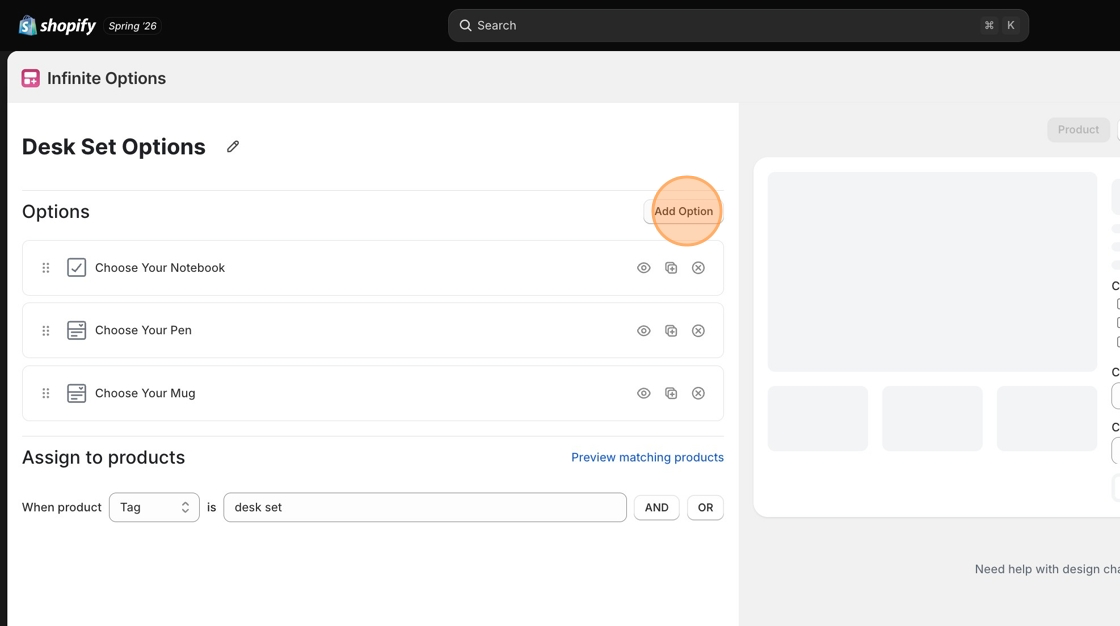
In the Infinite Options dashboard, go to your Option Set and click the Add Option button.
-
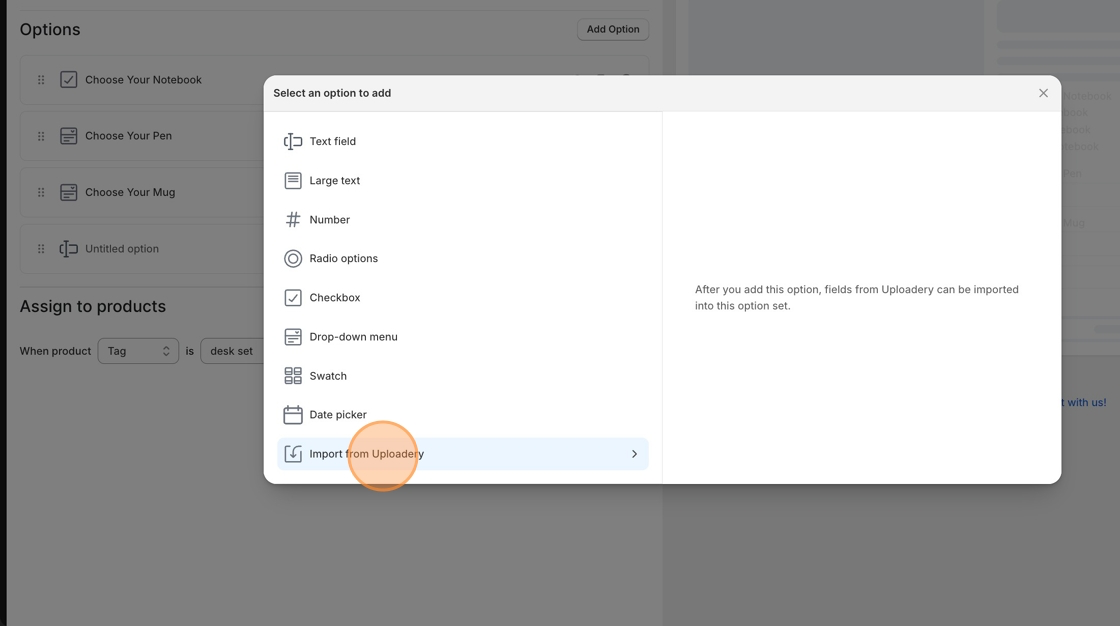
Select Import from Uploadery in the list and select the Uploadery option set you’ve assigned to Infinite Options to bring it into your Infinite Options setup.
-
Save your changes in Infinite Options.
-
If you want the upload field to appear only under certain conditions (for example, based on another option selection), you can create a conditional rule on that imported upload field. Infinite Options Docs
Important Notes
Section titled “Important Notes”- Previewing the option set inside the Infinite Options dashboard won’t show Uploadery’s conditional logic properly—you should view the product page on your storefront instead to test it. Infinite Options Docs
When to Use Uploadery
Section titled “When to Use Uploadery”Install Uploadery if your products require any of the following:
- Customers must upload an image or file to complete a custom order.
- You need to collect artwork, logos, or design files at the product level.
- You need advanced upload options like multiple file types or file size limits. Shopify App Store